📖 PAUL's Quick ReadYou can build a website with AI without writing code. Seriously. In 20 minutes. For less than lunch. People are paying $200 to $2,000 on Airtasker to hire someone to build a simple website—landing page, booking form, portfolio. Meanwhile, you can describe what you want to Claude or Durable in plain English and have it built, live, and deployed for under $100 to get started. No code. No developers. No markup language. This is the moment you realise websites aren't expensive anymore—they're trivial.
📑 Table of Contents
Why AI Changes Everything
Here's what changed: AI can read natural language now. You describe your website in English. Claude reads it. Durable reads it. Lovable reads it. They build it. No code. No developer. No $2k Airtasker bill. You just describe what you want, and it happens.
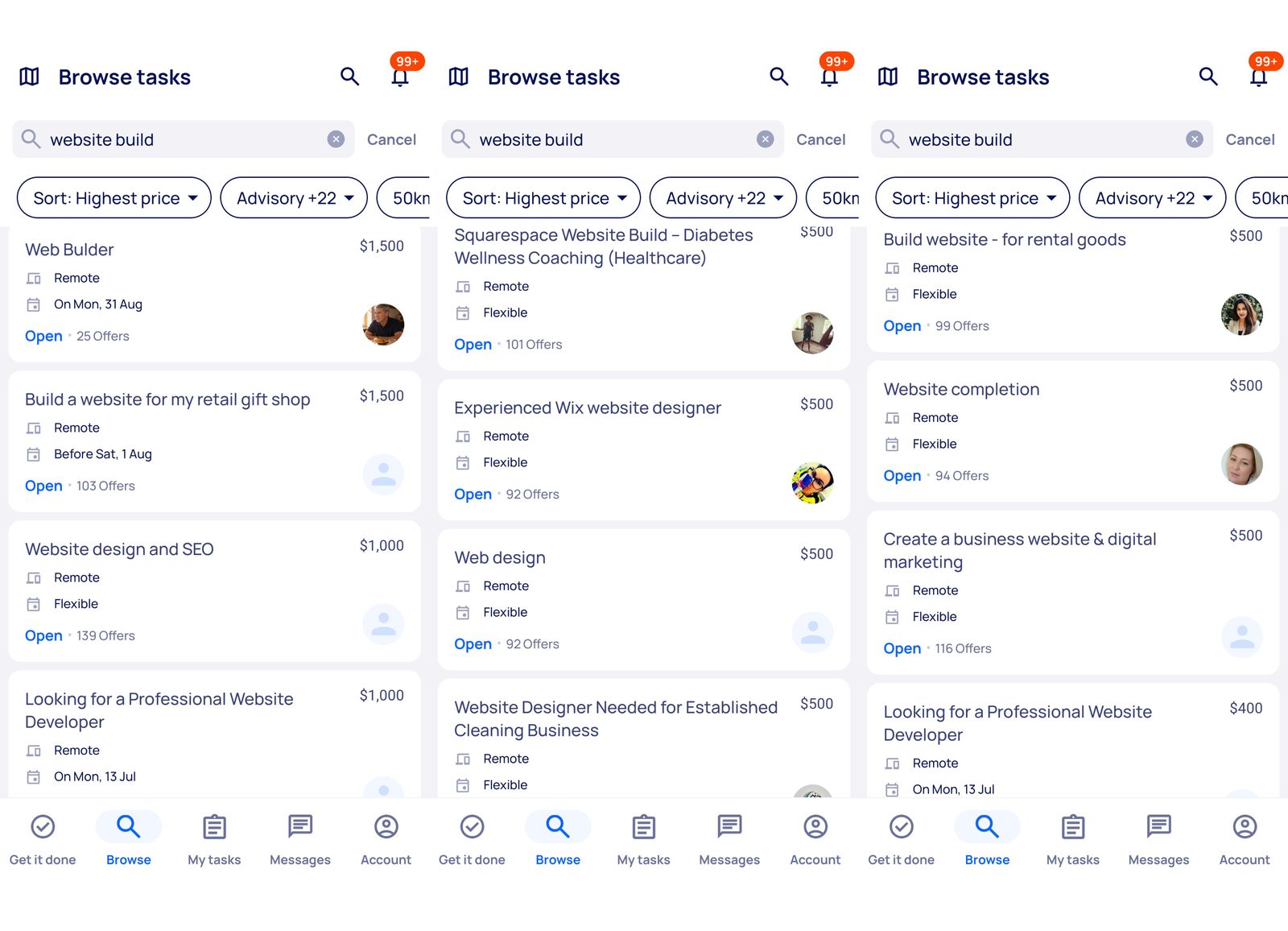
Scroll Airtasker right now and search "build me a website." You'll see hundreds of listings: $500–$2,000 each. Landing pages. Booking systems. Portfolios. Contact forms. Simple stuff. Things that now take 20 minutes and cost less than $100 to build yourself using AI.
The bit that breaks my accountant brain: people are spending $2,000 to hire someone to sit down with an AI tool and describe their website. Meanwhile, the AI does the actual building. Why not cut out the middleman? Why not sit down with the AI yourself, describe your website in plain English, and have it live the same day?
That's what this article is about. The exact playbook. Three paths. All use AI. All use natural language. All cost less than lunch per month. All skip the $2,000 Airtasker markup.
Quick Comparison: Which AI Build Path?
| Option | AI Tool | Cost/Month | Build Time | Best For |
|---|---|---|---|---|
| Easy | Durable AI | $25 | 2 min | Fastest launch |
| Medium | Lovable AI | $25 | 1–2 hrs | Custom design |
| Advanced | Claude AI | $20 | 2–4 hrs | Own everything |
Prices are in US dollars as listed on each provider's website in November 2026, on monthly billing unless noted. They change often, so check before you sign up.
| What Matters | Easy | Medium | Advanced |
|---|---|---|---|
| Uses AI? | ✅ Yes (Durable) | ✅ Yes (Lovable) | ✅ Yes (Claude) |
| Write Code? | ❌ No | ❌ No | ❌ No |
| Natural Language? | ✅ Yes | ✅ Yes | ✅ Yes |
| Total Cost (Year 1) | ~$300 | $210–$480 | ~$250 |
| Customization | Limited | Good | Unlimited |
Easy: Squarespace & Durable (~$25/month)
How to use AI to build: Durable's AI literally reads English and builds your site. You describe your business in natural sentences: "I'm a finance coach. I charge $100/session. I want a booking form." Durable generates the site. That's it.
Cost reality: Durable's Launch plan is $25/month (a little less on yearly billing). Squarespace starts at $25/month, or $19/month if you pay annually. Year 1 total: roughly $230–$300. Compare to Airtasker: $500–$2,000. You save $1,600+ and get it done 10x faster. That's the kind of variance that makes an accountant sit up straight.
What you can build: Service booking sites (coaching, design, consulting). Freelancer portfolios. Small business landing pages. Lead generation. Anything that's "simple and professional."
How fast? Durable generates a working site from your description in about 2 minutes. Not exaggerating—it happens right in front of you, and it's done before a Drake song finishes.
Pros: Hosting included. Templates look professional. AI does the design. Drag-and-drop to tweak. Automatic backups and SSL. Customer support.
Cons: Limited customisation. Locked into their platform. Harder to migrate if you outgrow.
PAUL's Prompt (Easy Tier)
Paste this into Durable's AI website builder:
📋 See Full Prompt (Click to Expand)
Before you start building my website, please interview me about the following and wait for my responses: (1) What is your business or service? (e.g., coaching, consulting, freelancing, etc.) (2) Who is your target audience? (e.g., young professionals, business owners, etc.) (3) What is the main goal of this website? (e.g., booking appointments, lead generation, selling products, etc.) (4) What is your preferred color palette? (Provide color names or hex codes, or describe your brand vibe) Once you have my answers, create a professional, custom website with these sections: (1) Hero section with a compelling headline about my service, a subheading explaining the benefit, and a clear "Book Your Session" or "Get Started" CTA button (2) About me section with my background, credentials, and why I do what I do (3) Services section listing my main offerings with descriptions, pricing, and what clients can expect (4) Booking form (integrated with Calendly if available) that captures name, email, phone, preferred service, and preferred date/time (5) FAQ section addressing the 5-7 most common questions potential clients would ask (6) Testimonials/Social Proof section with 3–4 client quotes and results (or placeholder text I can customize) (7) Trust signals section: badges, certifications, years in business, number of clients served (8) Contact information in footer with email and phone number (9) Mobile-optimized throughout with fast load times Design style: Clean, modern, professional. Use the color palette I provided. Make typography easy to read. Include plenty of white space. Ensure the site feels trustworthy and approachable.
Result: Durable AI interviews you about your business. You answer in natural language. AI builds a custom site instantly. You tweak the text and images. It's live.
Medium: Lovable AI & Wix ($17–$40/month)
How to use AI to build: Lovable is an AI that reads your English descriptions and generates actual code. You describe your website. It builds interactive components. You don't write a single line. You customise with plain-language prompts. Rinse. Repeat.
Cost reality: Lovable Pro is about $25/month (there's a limited free plan to try it first). Wix runs about $17–$40/month on its main plans. Year 1: roughly $210–$480. Still less than half of what Airtasker charges. And you have way more control.
What you can build: E-commerce stores (sell products). Custom-branded business sites. Community platforms. Complex integrations. Anything beyond "simple landing page."
How fast? Lovable takes you from description to working prototype in minutes, with 1–2 hours total to fully launch once you've refined the design.
Pros: More customisation than Easy. AI speeds up design (Lovable). Better for e-commerce (Wix). Still zero code. Visual builder + natural language.
Cons: More expensive than Easy. Lovable is newer. Steeper learning curve. Platform-locked.
PAUL's Prompt (Medium Tier)
Paste this into Lovable's AI builder:
📋 See Full Prompt (Click to Expand)
Before you start building, please interview me about the following and wait for my responses: (1) What is your business or service? Describe what you do and the value you provide. (2) Who is your primary audience? What are their pain points? (3) What do you want visitors to do on your site? (book, buy, subscribe, contact, etc.) (4) What is your preferred color palette and brand vibe? (luxury, playful, corporate, creative, etc.) (5) Do you have any branding guidelines (logos, fonts) you want to use? Once you have my answers, build me a custom, professionally-designed website with these components: HOMEPAGE: - Compelling hero section with headline, subheading, hero image/video, and primary CTA - Problem/solution section addressing my audience's main pain point - Features/benefits section highlighting 3-5 key differentiators - Social proof section with testimonials, case studies, or client logos - FAQ section addressing common objections - Clear call-to-action section with multiple options (Book, Learn More, Contact) SERVICES/PRODUCTS PAGE: - Service/product overview section - Detailed pricing table comparing tiers or options - Feature comparison matrix showing what's included at each level - Individual service/product pages with descriptions, pricing, and booking/purchase options - Gallery or before/after images if applicable ABOUT PAGE: - Personal/company story narrative explaining why you do this work - Team member profiles (if applicable) with photos and bios - Timeline or milestones showing growth/experience - Values or mission statement - Client testimonials with photos and results ADDITIONAL PAGES: - Contact/booking page with contact form and calendar integration (Calendly) - Blog section with ability to add posts easily - Portfolio or gallery section if showcasing work DESIGN & TECHNICAL: - Modern, clean design using the color palette provided - Fully responsive mobile design - Fast loading times - Navigation menu with clear hierarchy - Footer with contact info, social links, and newsletter signup - Email capture forms throughout for lead generation - Integration with Calendly for booking or email service (Mailchimp) for newsletters - SEO optimization with proper headings, meta descriptions, and alt text INTERACTIVITY: - Smooth scrolling and transitions - Interactive elements that feel polished and professional - Contact forms that actually work and send notifications - Mobile-optimized layouts that are easy to navigate Make the site feel trustworthy, professional, and aligned with the brand voice I described.
Result: Lovable builds with you. You answer the interview. Lovable generates components in real-time. You watch it build live. You customise in plain language. You launch.
Advanced: Claude + GitHub + Netlify (~$20/month)
How to use AI to build: Claude is an AI that reads English and writes React code. You describe your website in natural language. Claude builds it. You push to GitHub. Netlify auto-deploys. Want to change something? Ask Claude in English. Claude updates the code. You push. It's live in 30 seconds.
Cost reality: Claude Pro $20/month (a bit less on annual billing). GitHub free. Netlify free tier (paid plans from $9/month if you ever outgrow it). Domain ~$12/year. Year 1 total: about $250. Compare: Airtasker $2k. Even Squarespace at $25/month is $300/year. This is the best long-term cost.
What you can build: Complex web apps. Databases and backend logic. Custom integrations (APIs, webhooks). Scalable infrastructure. Learning projects where you understand how everything works.
How fast? If you can write English, you can do this. My site (appcoaching.io) was built this way with Claude AI. I didn't write code (trust me, nobody wants to see me try). I described what I wanted. Claude built it.
Pros: You own the code. You own the infrastructure. Unlimited customisation. Scalable forever. Most cost-effective long-term. No vendor lock-in. You learn.
Cons: Steeper learning curve (Git, React deployment). Requires problem-solving. No drag-and-drop designer.
PAUL's Prompt (Advanced Tier)
Paste this into Claude.ai:
📋 See Full Prompt (Click to Expand)
Before you start coding, please interview me about the following and wait for my responses: (1) What is your business or service? What value do you provide? (2) Who is your target audience? What are their biggest pain points? (3) What is the primary goal of your website? (lead generation, sales, booking, portfolio, etc.) (4) What is your preferred color palette and brand vibe? (luxury, playful, corporate, modern, creative, etc.) (5) Do you have existing branding, logos, fonts, or style guides you want to use? (6) Do you need any integrations? (email service, payment processing, booking calendar, CRM, etc.) Once I have your answers, I will build you a complete, production-ready React website with: TECH STACK: - React with Vite for fast development and builds - Tailwind CSS for responsive, utility-based styling - React Router for clean URLs and navigation (no hash routing) - GitHub for version control - Netlify for automatic deployment (every git push = automatic site update) CORE PAGES: - Homepage: Compelling hero with headline, subheading, CTA, problem/solution section, features highlight, social proof/testimonials, FAQ, and footer - Services/Products Page: Full service/product listings with detailed descriptions, pricing tiers, feature comparison tables, and individual service pages - About Page: Personal/company narrative, team bios (if applicable), mission/values, client testimonials, and journey timeline - Blog Page: Markdown-based blog with category/tag filtering, individual post pages, related posts, and SEO optimization - Contact/Booking Page: Contact form, booking calendar integration (Cal.com), email capture, and appointment scheduling - Portfolio/Gallery Page (if applicable): Project showcase with filters and detailed case studies DESIGN & UX: - Fully responsive mobile-first design - Your custom color palette throughout - Smooth animations and transitions - Fast page load times and performance optimization - Accessible design following WCAG guidelines - Professional typography and whitespace management SEO & PERFORMANCE: - Complete structured data markup (Organization, Service, Person, BlogPosting schemas) - Dynamic meta tags and Open Graph tags for social sharing - Canonical tags to prevent duplicate content issues - Robot.txt and sitemap.xml generation - Image optimization and lazy loading - Clean, descriptive URLs with semantic slugs - Internal linking strategy connecting related content - Optimized images and fonts for performance FEATURES: - Dark mode option (if desired) - Email newsletter signup with integration - Contact forms that send notifications - Image galleries or carousels - Testimonials carousel - Pricing tables and feature comparisons - Blog with search functionality - Mobile-optimized navigation - Footer with all important links DEPLOYMENT: - Complete GitHub repository structure ready to push - Netlify.toml configuration for automatic deployment - Environment variables set up for any integrations - GitHub Actions (optional) for automated testing - Instructions for deploying to Netlify and custom domain setup DELIVERABLES: - Full source code with clear file structure and comments - README.md with setup instructions and deployment guide - List of all dependencies and versions used - Instructions for adding blog posts, services, or testimonials - Customization guide for your team (how to update colors, content, etc.) Build this as a complete, production-ready application. Include all files necessary to clone, install dependencies, run locally with `npm run dev`, build for production, and deploy to Netlify with automatic updates on each git push. Make it extensible so you can easily add more pages, blog posts, and features in the future.
Result: Claude interviews you and builds complete code. You get the entire GitHub repo. Push to GitHub. Netlify auto-deploys. Your site goes live in 10 minutes. Total investment: your time to describe your business in plain English.
How to Choose Your AI Build Path
Choose EASY if: You want it live today. You don't want to think about design. You're a solopreneur or coach. You don't need e-commerce. Professional templates are enough. Zero headaches.
Choose MEDIUM if: You need design control. You're selling products. You want custom branding. Squarespace feels limiting. You're willing to spend 1–2 hours.
Choose ADVANCED if: You want full ownership. You're building complex features. You want to understand how it works. You think long-term (scales forever). You're willing to learn Git (it's less scary than it sounds, and a lot less scary than a $2k invoice).
⬆️ PAUL's LevelUpProfessional websites don't require $5k anymore. All three paths use AI. All three use natural language (no code). Squarespace or Durable (Easy) costs about $25/month. Lovable or Wix (Medium) costs about $17–$40/month. Claude + GitHub + Netlify (Advanced) costs about $20/month. The cost barrier is gone. The technology exists. The only question is: simplicity, customization, or ownership? Pick your path. Use the prompt. Launch today. Stop overpaying for work that's now trivial.
Ready to Build With AI?
Describe your website in English. AI builds it. You launch. No code. No developers. Just natural language.